


Reading a water meter is simple once you understand what the numbers, dials, and displays mean.
To read a water meter:
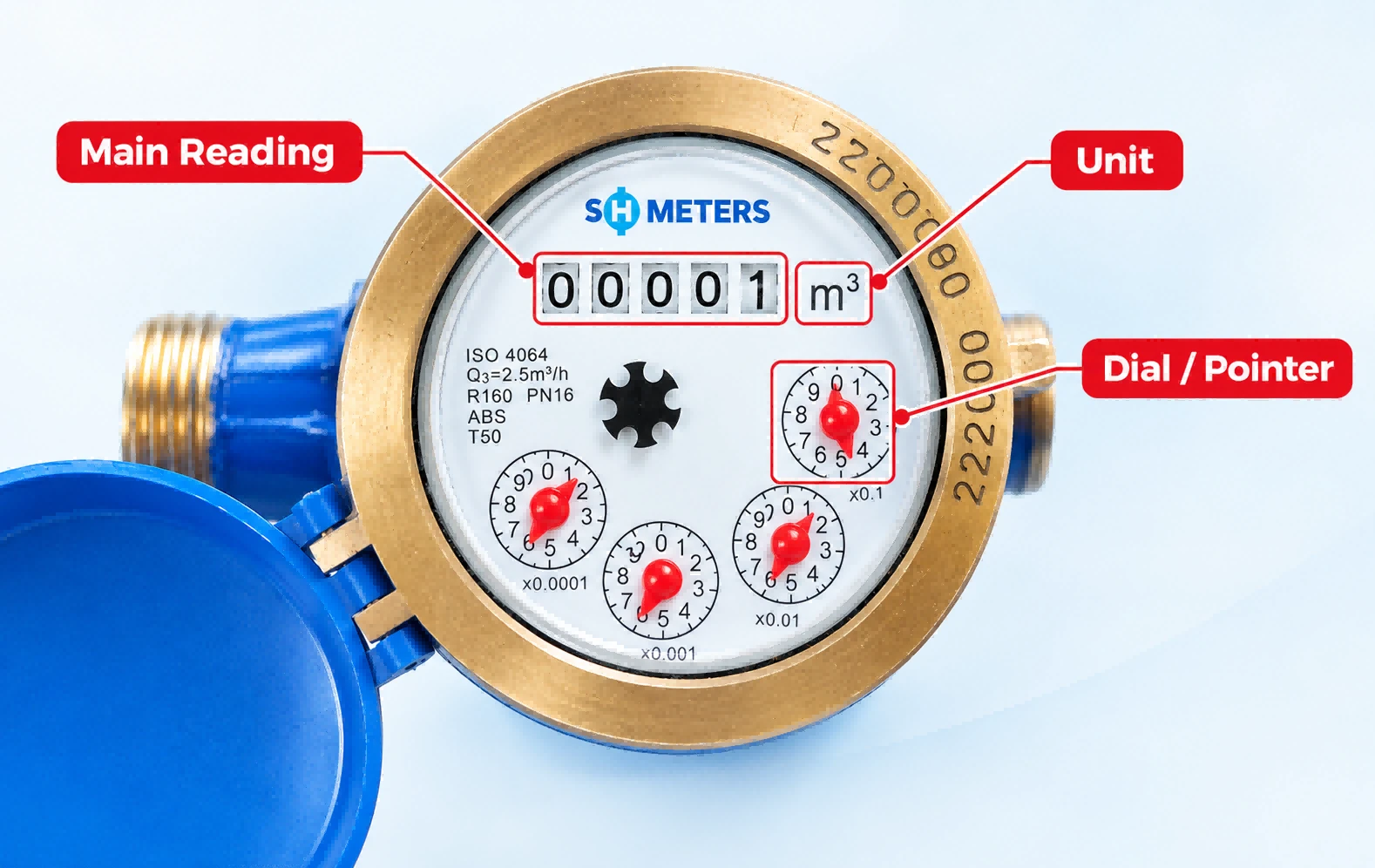
- Find the main meter register or digital display.
- Read the numbers from left to right according to the meter's display.
- Check the measurement unit, such as m³ or litres.
- If the meter has a dial or pointer, read it according to the scale shown on the meter.
- Record the reading together with the date.
- Compare the current reading with the previous reading to calculate your water consumption.
For many household water meters, the main number register shows the accumulated volume of water measured by the meter. Smaller dials or decimal digits may show more precise measurements.
The exact reading method depends on the design of the water meter and, in some cases, the reading or billing rules used by the local water utility.
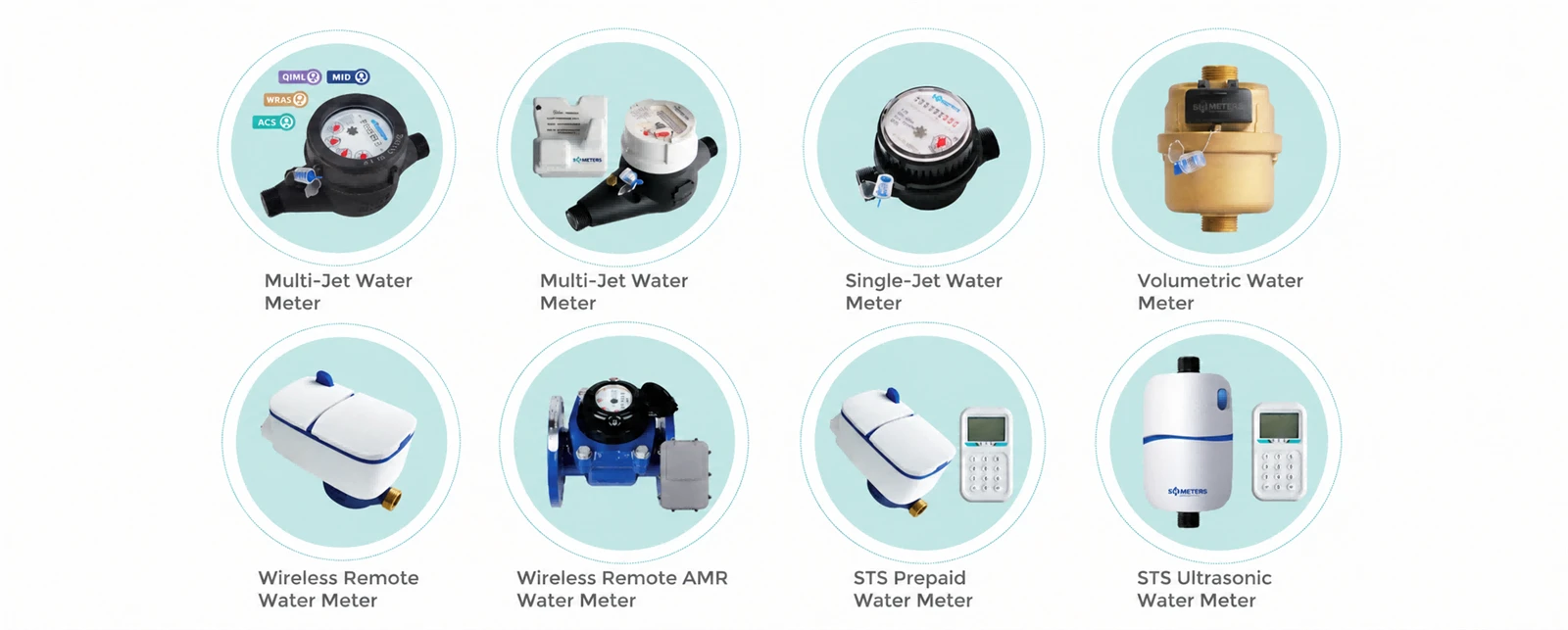
How to Identify Your Water Meter Type?
Before taking a water meter reading, identify the type of meter you have. Different water meters may use numbered registers, pointers, dials, or digital displays.
Mechanical Water Meter
A mechanical water meter usually has a series of numbered wheels and may also include a dial or pointer.
The number register records the accumulated volume of water that has passed through the meter. To take a reading, locate the main register and read the numbers according to the markings on the meter.
Digital Water Meter
A digital water meter displays water consumption electronically, usually on an LCD or other digital screen.
Depending on the meter design, the display may show total water consumption, flow rate, alarms, battery information, or other operating data.
When taking a reading, identify the main consumption value and check the unit displayed on the meter.
Pointer or Dial Water Meter
Some mechanical water meters use a circular dial with a pointer to show smaller units of water consumption.
Read the pointer position according to the scale marked around the dial. If your meter has several dials, check the labels and units carefully before recording the reading.
Prepaid Water Meter
A prepaid water meter may use a digital display to show remaining credit, accumulated consumption, or other information.
The exact display depends on the meter and prepaid system being used. If you are checking water consumption, look for the display showing accumulated or current consumption rather than remaining credit.
How to Read a Water Meter Step by Step
Once you have identified your meter type, follow these steps to record the reading correctly.
1. Locate the Meter Register
Find the main number register or digital display on the water meter.
Depending on the installation, the meter may be located in a meter box near the property boundary, driveway, sidewalk, building entrance, or another accessible location.
If the meter is installed in a box, open the cover carefully and make sure the display is clearly visible.
2. Read the Numbers from Left to Right
For a mechanical water meter, read the numbered wheels from left to right.
Pay attention to the position of each digit and avoid including numbers or markings that are not part of the main consumption register.
For a digital water meter, record the value shown on the main consumption display.
3. Check the Dial or Pointer
If your meter has a dial or pointer, check the scale around the dial.
Some meters use a pointer to display decimal values or smaller units of consumption. Read the pointer according to the markings shown on the meter.
If there is more than one dial, check the unit and scale of each dial before recording the reading.
4. Check the Measurement Unit
Look for the measurement unit printed or displayed on the meter.
Many water meters measure volume in cubic metres (m³), while some meters may also display litres (L), cubic feet (ft³), gallons, or other units.
Always confirm the unit before recording or comparing readings.
5. Record the Reading
Write down the meter reading together with the date.
For example:
Meter reading: 132 m³
Date: September 20, 2026
Keeping regular records makes it easier to calculate water consumption and identify unusual changes in usage.
How to Read a Water Meter in m³
Cubic metre (m³) is a common unit used to measure water consumption.
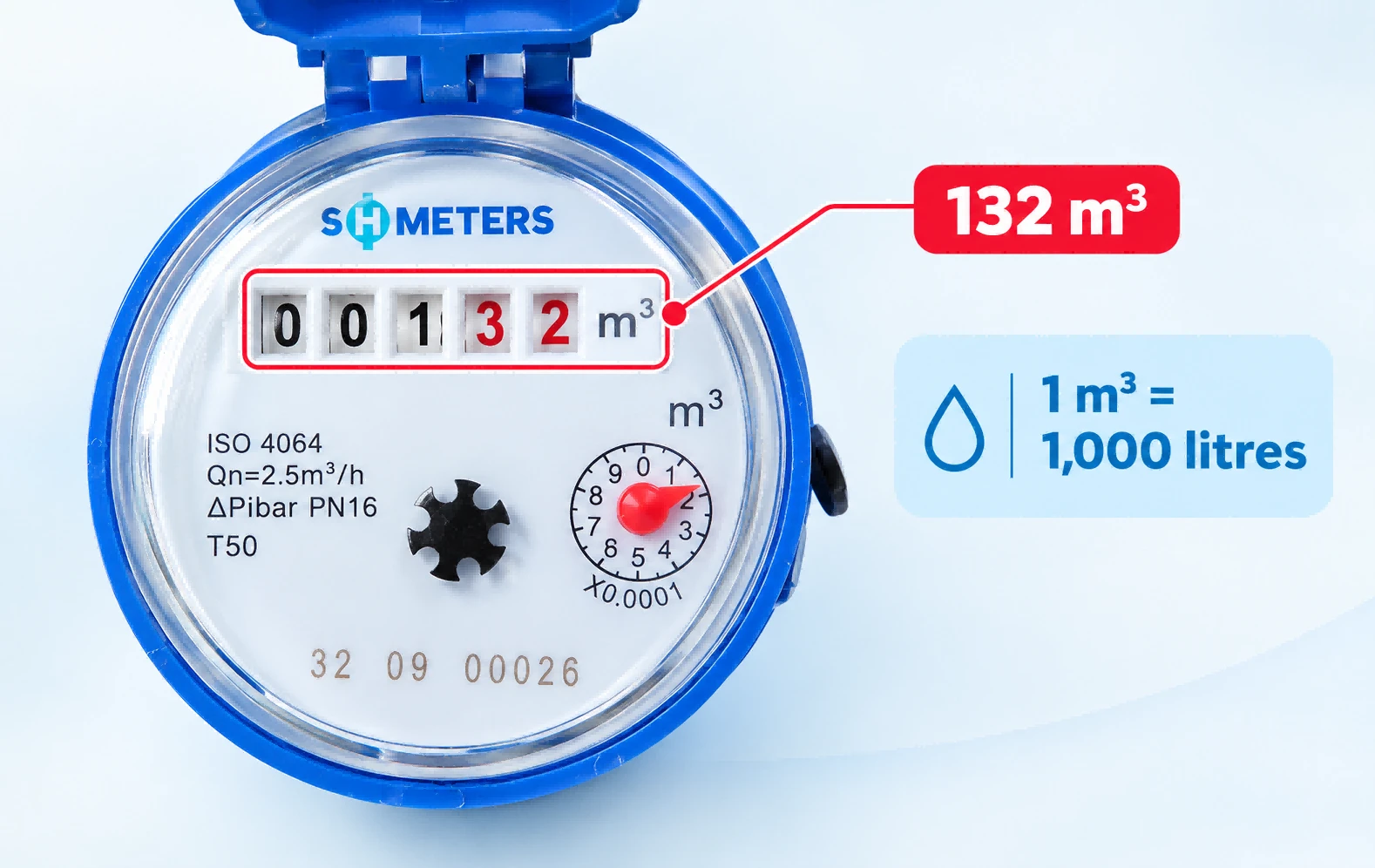
1 m³ = 1,000 litres
If your water meter displays readings in cubic metres, you can calculate the amount of water used between two readings by subtracting the previous reading from the current reading.
For example:
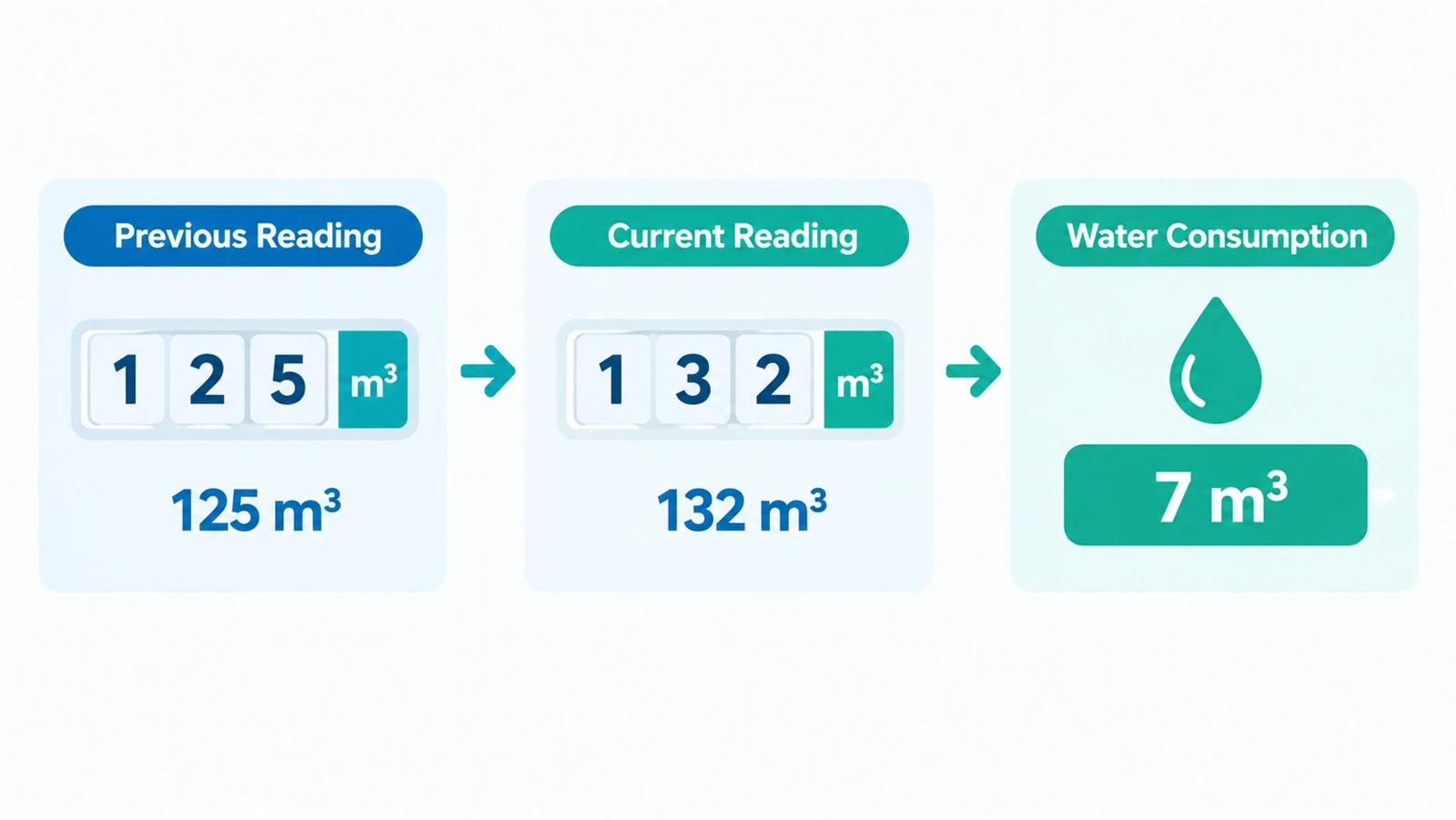
Previous reading: 125 m³
Current reading: 132 m³
Water consumption:
132 m³ − 125 m³ = 7 m³
Therefore, the water consumption during this period was 7 cubic metres, or 7,000 litres.
If your water meter displays decimal values, record them according to the meter display and the reading or billing rules applicable to your location.
How to Calculate Your Water Consumption
Your water meter normally records cumulative water consumption.
To calculate how much water has been used during a specific period:
Current meter reading − Previous meter reading = Water consumption
For example:
Current reading: 250 m³
Previous reading: 238 m³
250 − 238 = 12 m³
The water consumption for the period is 12 m³, which is equal to 12,000 litres.
Regularly recording your meter readings can help you understand your water usage and identify unusual increases.
How to Check for a Water Leak Using Your Meter
Your water meter can also help you identify possible water leaks.
First, make sure all taps, toilets, appliances, irrigation systems, and other water-using equipment are turned off.
Record the current meter reading, then avoid using water for a period of time. Check the meter again afterward.
If the reading has changed even though no water was intentionally used, there may be a leak or another source of water consumption.
If you suspect a leak, contact a qualified plumber or your local water utility for further inspection.
Common Water Meter Reading Questions
How do you read a water meter?
Locate the main number register or digital display and read the displayed value according to the unit marked on the meter. If the meter has a dial or pointer, read it according to the scale shown on the meter.
Which numbers should I read on my water meter?
This depends on the meter design. Generally, record the main consumption register and follow the reading method specified for your meter or local water utility.
How do you read a water meter in m³?
Check the meter display for the value marked in cubic metres (m³). To calculate water consumption over a period, subtract the previous reading from the current reading.
What do the numbers on a water meter mean?
The numbers normally represent the cumulative volume of water measured by the meter. Additional digits, dials, or displays may represent decimal values, smaller units, or other measurements.
How do you read a digital water meter?
Find the main consumption value on the digital display and check the unit shown on the meter. Some digital meters may cycle through several values, so make sure you record the consumption reading rather than another display parameter.
How do you read a water meter with a dial?
Check the scale around the dial and read the position of the pointer. If the meter has multiple dials, check the label and unit of each dial before recording the reading.
How often should I read my water meter?
You can record your meter regularly, such as weekly or monthly, depending on why you need the reading. Regular records can help you monitor consumption and identify unusual changes in usage.
Explore Water Meter Solutions
Looking for a water meter for your application?
Explore our range of mechanical, ultrasonic, prepaid, and smart water meters.